runAnsiblePlaybook
- Keith Ecker (Unlicensed)
- Chandresh Patel
Runs an Ansible playbook YAML file. This operation takes a name or path of the specific playbook file as well as any desired arguments and runs the playbook.
Environment/Instance Properties
Property Name | Property Code | Required | Description |
|---|---|---|---|
Project Properties
Property Name | Property Code | Required | Description |
|---|---|---|---|
Input
| Input Name | Input Code | Required | Description |
|---|---|---|---|
| Ansible Home | FDANS_INP_ANSIBLE_HOME | No | Absolute directory path where Ansible is installed. |
| Ansible Playbook | FDANS_INP_PLAYBOOK | Yes | Absolute or relative path to Ansible playbook YAML file. Relative path will be looked in temp and artifact directory. Absolute Path Example: /home/ubuntu/ansibleTest/testPlaybook.yml Relative Path Example: ansibleTest/testPlaybook.yml |
| Inventory File | FDANS_INP_INVENTORY | No | Absolute path to the inventory file to use with the playbook invocation. (CLI arg: -i) |
| Become Method | FDANS_INP_BECOME_METHOD | No | Privilege escalation method to use. (CLI arg: --become-method) valid choices: [ sudo | su | pbrun | pfexec | doas | dzdo | ksu | runas | machinectl ] If privilege escalation method is selected -b CLI argument will be passed. |
| Become User | FDANS_INP_BECOME_USER | No | Run operations as. (CLI arg: --become-user) If value is provided -b CLI argument will be passed. |
| Extra Variables | FDANS_INP_EXTRA_VARS | No | Additional variables as key=value, JSON text, or a JSON/YAML file. Formatted as key=value. If passing a JSON/YAML file you must use an @ before the file name. One pair per line (CLI arg: -e) Key/Value Example: var1=val1 var2=val1" JSON Example: {"version":"1.23.45","other_variable":"foo"} JSON/YAML File Example: @some_file.json |
| Parallel Processes | FDANS_INP_FORKS | No | Number of parallel processes to use. (CLI arg: -f) |
| Host Limit | FDANS_INP_LIMIT | No | Limiting of the selected hosts to an additional pattern. Outputs a list of matching hosts. If more than one the different tags must be separated by a comma.(CLI arg: -l) Multiple Hosts Example: host1,host2 |
| Skip Tags | FDANS_INP_SKIPPED_TAGS | No | Only run plays and tasks whose tags do not match these values. If more than one the different tags must be separated by a comma. (CLI arg: --skip-tags) Multiple Tags Example: configuration,packages |
| Start at Task | FDANS_INP_START_AT_TASK | No | Start the playbook at the task matching this name. (CLI arg: --start-at-task) |
| Run Tags | FDANS_INP_TAGS | No | Only run plays and tasks tagged with these values. If more than one the different tags must be separated by a comma. (CLI arg: -t) Multiple Tags Example: configuration,packages |
Outputs
| Output Name | Description |
|---|---|
Artifacts
This operation consumes artifacts from the artifacts repository.
Endpoint Selection
This operation will select all available endpoints associated to the environment/instance. Ansible must be installed on any endpoint that executes this plugin. The user can use the LOCALHOST endpoint if Ansible is installed on the FlexDeploy server.
Endpoint Execution
This operation will execute on any one of the selected endpoints and will be random in the determination of which one.
Example
Below you can see an example of inputs used on the runAnsiblePlaybook plugin operation.
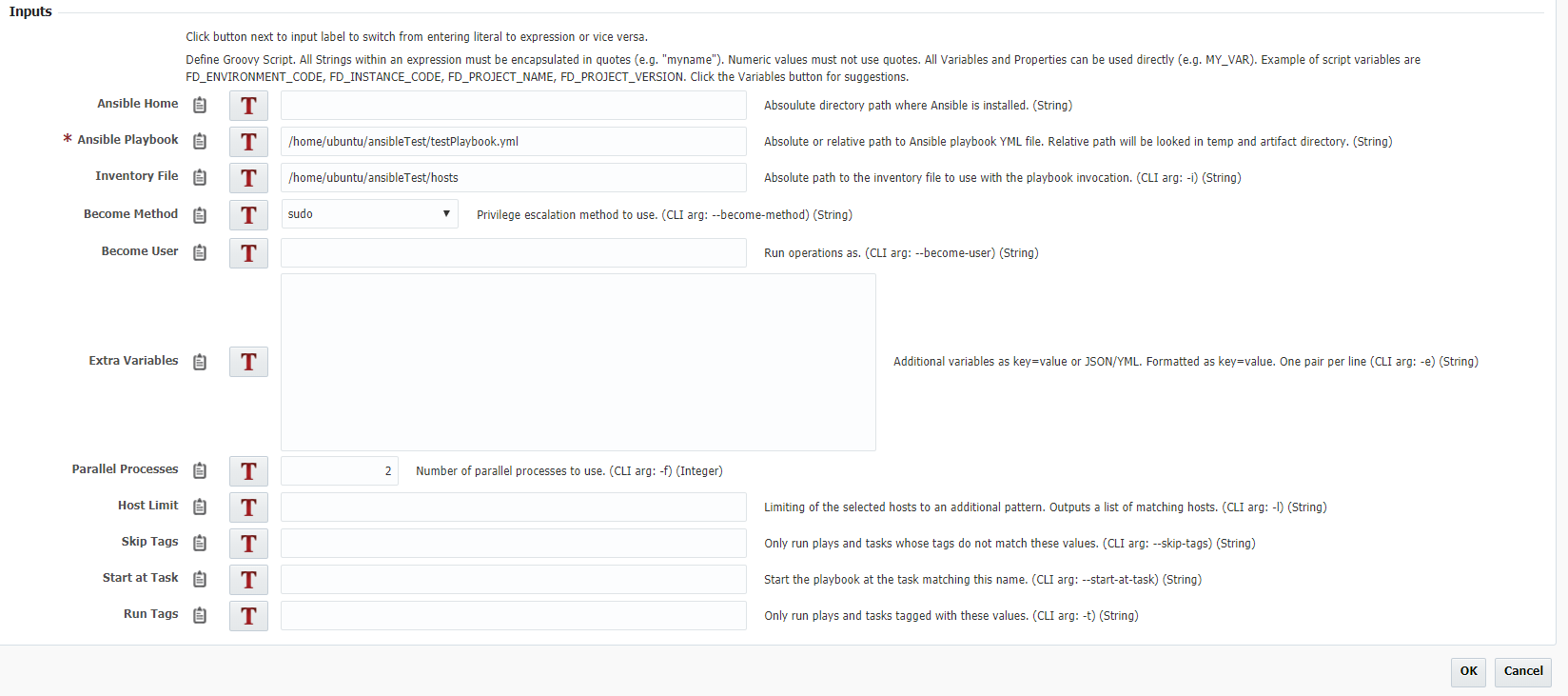
Below is the Ansible playbook that is saved in /home/ubuntu/ansibleTest. This plugin verifies that Apache is up to date, starts the server if it is not running, and stops the server if it is running.
---
- hosts: dkrlp01
#  become: yes
  tasks:
          - name: verify latest version Apache
            apt:
                name: apache2
                update_cache: yes
                state: latest

          - name: ensure httpd is running
            service:
                name: apache2
                state: started
          - name: stop apache
            service:
                    name: apache2
                    state: stopped
Below is the hosts inventory file that is saved in /home/ubuntu/ansibleTest
[apache]
dkrlp01 ansible_ssh_host=dkrlp01.flexagon ansible_ssh_user=ubuntu ansible_ssh_pass=welcome1

[all:vars]
ansible_sudo_pass=welcome1
- style