createOrUpdateJMSEntries
- Copy Page Tree
- Karl Henselin
- Ben Hoffman
- Chandresh Patel
Creates or updates JMS Entries defined by properties files. The properties files will be processed for property replacement using ${{VARIABLE_NAME}} format. See Property Replacement Support for more information about property replacement.
If using multiple files, make sure that the lists contain unique values across files.
If you want to detect changes in WebLogic resource (properties) files and only deploy changed files, you can implement custom workflow as defined in Custom Workflow to detect changes in Properties Files.
Blog Posts
Environment/Instance Properties
| Property Name | Property Code | Required | Description |
|---|---|---|---|
| Oracle Weblogic Home (WL_HOME) |
| Yes | WebLogic Home Directory. (e.g. /u01/oracle/products/fmw/wlserver) |
| Weblogic Domain Name |
| Yes | WebLogic Domain Name. |
| Weblogic Admin Listen Address |
| Yes | The listener address of the WLS admin server. (e.g. localhost) |
| Weblogic Admin Listen Port |
| Yes | The port of the WLS admin server. (e.g. 7001) |
| Weblogic Admin SSL Connection |
| No | Indicates whether the admin server is using SSL. |
| Weblogic Admin User |
| Yes | The user name for the WLS admin server. |
| Weblogic Admin Password |
| Yes | The password for |
| Weblogic Admin Domain Directory |
| No | Weblogic Domain Directory for AdminServer. If not provided, |
| Weblogic Domain Directory |
| Yes | Weblogic Domain Directory.(e.g. |
Project Properties
Property Name | Property Code | Required | Description |
|---|---|---|---|
Inputs
| Property Name | Property Code | Required | Description |
|---|---|---|---|
| Properties File Path | FILE_PATH_TO_PROPERTIES | No | Comma-separated list of paths to the properties file(s). |
Outputs
Output Name | Required | Description |
|---|---|---|
FDWLS_OUT_IS_RESTART_REQUIRED | No | A |
Artifacts
This operation consumes properties-file artifacts.
Endpoint Selection
This operation will select all available endpoints associated to the environment instance which have a resource type of WLS Admin Server. Since the admin server only runs on one server, it is expected that for a given domain, there will only be one endpoint with a resource type set to WLS Admin Server.
Endpoint Execution
This operation will execute on the Admin Server endpoint selected using the WLS Admin Server resource type.
Special Considerations
If Properties File Path is not specified, the FD_ARTIFACTS_DIR folder will be used. If a relative path is specified, the path will be relative to the FD_ARTIFACTS_DIR directory. WebLogic configuration files including JMS modules are backed up to FD_TEMP_DIR/configbackup before modifications. As with all files in the endpoint working directory, these files will be saved for 3 days before being deleted.
Example Folder Structure
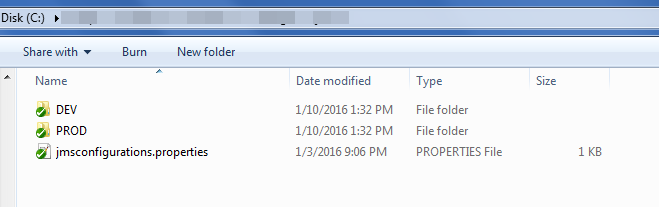
- Properties file can be named as per your requirements. See Example Properties File below.
jmsconfigurations.properties– This is the main properties file. The path to it is referenced byProperties File Path.DEV/ jmsconfigurations.properties- optionally create a file here and override some properties with it per environment. The filename must match.PROD/ jmsconfigurations.properties- optionally have several environments.- Sub folder names for environment overrides must be FlexDeploy environment code.
Example Property File
This sample file defines a few simple JMS objects with a sub-set of the available properties. The name used in each of the lists will be the name used on the server.
Backslash in Properties file
If you want \ (backslash) in any property value, use \\ or \u005c. This is Java properties file load syntax.
SystemModuleList=Flex_JMSModule1
SubDeploymentList=Flex_JMSSubdeployment1
ConnectionFactoryList=CF1
QueueList=Q1
TopicList=T1
UniformDistributedQueueList=UDQ1
UniformDistributedTopicList=UDT1

Flex_JMSModule1.Targets=MS1

Flex_JMSSubdeployment1.SystemModule=Flex_JMSModule1
Flex_JMSSubdeployment1.Targets=Flex_JMSServer1

CF1.SystemModule=Flex_JMSModule1
CF1.JNDI=jms/CF1
CF1.Targets=MS1
CF1.XAConnectionFactoryEnabled=False
CF1.DefaultTargetingEnabled=True

Q1.SystemModule=Flex_JMSModule1
Q1.JNDI=jms/Q1
Q1.SubDeployment=Flex_JMSSubdeployment1
Q1.DeliveryMode=Persistent

T1.SystemModule=Flex_JMSModule1
T1.JNDI=jms/T1
T1.SubDeployment=Flex_JMSSubdeployment1

UDQ1.SystemModule=Flex_JMSModule1
UDQ1.JNDI=jms/UDQ1
UDQ1.SubDeployment=Flex_JMSSubdeployment1
UDQ1.Notes=Notes on UDQ1

UDT1.SystemModule=Flex_JMSModule1
UDT1.JNDI=jms/UDT1
UDT1.SubDeployment=Flex_JMSSubdeployment1
UDT1.Notes=Notes on UDT1
Properties File Format
Multiple JMS Properties can be defined in each properties file. Each properties file must start with one or more lists of JMS element types present in the file. Any number of element types is acceptable in each file, and any number of each type of element is acceptable as well.
If using multiple files, make sure that the lists contain unique values across files.
The properties files will be processed for property replacement using ${{VARIABLE_NAME}} format. See Property Replacement Support for more information about property replacement.
JMS Element List Objects
JMS Element Type | List Name | Example |
|---|---|---|
| Bridge (since 4.5.1.8) | BridgeList | Example |
| Bridge Destination (since 4.5.1.8) | BridgeDestinationList | Example |
Connection Factory | createOrUpdateJMSEntries#Example | |
Destination Sort Key | ||
| File Store | FileStoreList | |
Foreign Server | ||
| JDBC Store | JDBCStoreList | |
| JMS Server | JMSServerList | |
Queue | createOrUpdateJMSEntries#Example | |
Quota | ||
| Replicated Store | ReplicatedStoreList | |
SubDeployment | createOrUpdateJMSEntries#Example | |
System Module | createOrUpdateJMSEntries#Example | |
Topic | createOrUpdateJMSEntries#Example | |
Uniform Distributed Queue | createOrUpdateJMSEntries#Example | |
Uniform Distributed Topic | createOrUpdateJMSEntries#Example | |
Weighted Distributed Queue | ||
Weighted Distributed Topic |
JMS Element Properties
All required properties are listed with an asterisk (all other properties are optional).
Bridge (Released in 4.5.1.8)
Property Name | Default Value | Notes | |
| Name | The name from the list is used by default. | ||
| AsyncEnabled | true | (true | false) | |
| DistributionPolicy | Singleton | (Distributed | Singleton) | |
| DurabilityEnabled | true | (true | false) | |
| IdleTimeMaximum | 60 | ||
| MigrationPolicy | On-Failure | (Always | Off | On-Failure) | |
| Notes | <not set> | ||
| PreserveMsgProperty | false | (true | false) | |
| QualityOfService | Exactly-once | (Atmost-once | Duplicate-okay | Exactly-once) | |
| QOSDegradationAllowed | false | (true | false) | |
| Selector | Empty Value | ||
SourceDestination* | <not set> | ||
| Started | false | (true | false) | |
TargetDestination* | <not set> | ||
Targets* | <not set> | ||
Bridge Destination (Released in 4.5.1.8)
Property Name | Default Value | Notes | |
| Name | The name from the list is used by default. | ||
| AdapterJNDIName | eis.jms.WLSConnectionFactoryJNDIXA | ||
| ConnectionUrl | Empty Value | ||
| DestinationType | Queue | (Queue | Topic) | |
| Notes | <not set> | ||
| Password | <not set> | ||
| UserName | <not set> | ||
| Partition | <not set> | ||
| ResourceGroup | <not set> | ||
| ResourceGroupTemplate | <not set> | ||
BridgeDestinationList=myBridgeSource,myBridgeDestination
BridgeList=myBridge

myBridgeSource.ConnectionFactoryJNDIName=jms/cf1
myBridgeSource.DestinationJNDIName=jms/q1
myBridgeSource.DestinationType=Queue
myBridgeSource.UserName=user
myBridgeSource.Password=password
myBridgeSource.Notes=some notes are in here.
myBridgeSource.ConnectionUrl=t3://soalt06:7001

myBridgeDestination.ConnectionFactoryJNDIName=/jms/cf2
myBridgeDestination.DestinationJNDIName=jms/q1
myBridgeDestination.DestinationType=Queue
myBridgeDestination.UserName=user
myBridgeDestination.Password=password
myBridgeDestination.Notes=some notes are in here.
myBridgeDestination.ConnectionUrl=t3://soalt08:7001

myBridge.Targets=AdminServer
myBridge.SourceDestination=myBridgeSource
myBridge.TargetDestination=myBridgeDestination
myBridge.Started=true
Connection Factory
Property Name | Default Value | Notes | |
| Name* | <not set> | ||
SystemModule* | <not set> | ||
JNDI | <not set> | ||
AcknowledgePolicy | All | ||
AttachJMSXUserId | False | (True | False) | |
ClientID | <not set> | ||
ClientIdPolicy | Restricted | (Restricted | Unrestricted) | |
DefaultCompressionThreshold | 2147483647 | ||
DefaultDeliveryMode | Persistent | (Persistent | Non-Persistent) | |
DefaultPriority | 4 | ||
DefaultRedeliveryDelay | 0 | ||
DefaultTargetingEnabled | True | (True | False) | |
DefaultTimeToDeliver | 0 | ||
DefaultTimeToLive | 0 | ||
DefaultUnitOfOrder | None | (None | Other | System) | |
UserDefaultUnitOfOrder | <not set> | used if | |
FlowInterval | 60 | ||
FlowMaximum | 500 | ||
FlowMinimum | 50 | ||
FlowSteps | 10 | ||
LoadBalancingEnabled | True | (True | False) | |
LocalJNDIName | <not set> | ||
MessagesMaximum | 10 | ||
MulticastOverrunPolicy | KeepOld | (KeepOld | KeepNew) | |
Notes | <not set> | ||
OneWaySendMode | Disabled | (disabled | enabled) | |
OneWaySendWindowSize | 1 | ||
ReconnectBlockingMillis | 60000 | ||
ReconnectPolicy | Producer | (all | none | producer) | |
SendTimeout | 10 | ||
ServerAffinityEnabled | True | (True | False) | |
SubscriptionSharingPolicy | Exclusive | (Exclusive | Sharable) | |
SynchronousPrefetchMode | Disabled | (disabled | topicSubscriberOnly | enabled) | |
TotalReconnectPeriodMillis | -1 | ||
TransactionTimeout | 3600 | ||
XAConnectionFactoryEnabled | True | (True | False) | |
Destination Sort Key
Property Name | Default Value |
|---|---|
| Name* | <not set> |
SystemModule* | <not set> |
KeyType | String |
Notes | <not set> |
SortKey | JMSMessageID |
SortOrder | Ascending |
File Store
Property Name | Default Value | Notes |
|---|---|---|
| StoreName* | <not set> | |
Directory | <not set> | |
BlockSize | -1 | |
MaxFileSize | 1342177280 | |
FileLockingEnabled | true | (True | False) |
LogicalName | <not set> | |
| InitialSize | 0 | |
| IoBufferSize | 1 | |
| SynchronousWritePolicy | Direct-Write | (Cache-Flush | Direct-Write-With-Cache | Direct-Write | Disabled) |
| CacheDirectory | <not set> | |
| Notes | <not set> | |
| Targets | <not set> | |
| MinWindowBufferSize | -1 | |
| MaxWindowBufferSize | -1 | |
| Properties below are only compatible with WLS Version 12.2.1+ | ||
| InitialBootDelaySeconds | -1 | |
| RestartInPlace | true | (True | False) |
| FailbackDelaySeconds | -1 | |
| NumberOfRestartAttempts | 6 | |
| DistributionPolicy | Distributed | (Singleton | Distributed) |
| MigrationPolicy | Off | (Off | On-Failure | Always) |
| PartialClusterStabilityDelaySeconds | -1 | |
| SecondsBetweenRestarts | 30 | |
| Partition | <not set> | |
| ResourceGroup | <not set> | |
| ResourceGroupTemplate | <not set> | |
Foreign Server
| Property Name | Default Value | Notes | |||||||||||||||
| Name* | <not set> | ||||||||||||||||
SystemModule* | <not set> | ||||||||||||||||
ConnectionURL* | <not set> | ||||||||||||||||
DefaultTargetingEnabled | True | (True | False) | |||||||||||||||
| SubDeployment | <not set> | ||||||||||||||||
ForeignCFNames (Comma-separated list of Foreign Connection Factories) | <not set> | ||||||||||||||||
ForeignCF{Name}EncryptedPassword | <not set> | ||||||||||||||||
ForeignCF{Name}HealthChecking | disabled | (disabled | enabled) | |||||||||||||||
ForeignCF{Name}LocalJNDI | <not set> | ||||||||||||||||
ForeignCF{Name}Password | <not set> | ||||||||||||||||
ForeignCF{Name}RemoteJNDI | <not set> | ||||||||||||||||
ForeignCF{Name}Username | <not set> | ||||||||||||||||
ForeignDestinationNames (Comma-separated list of Foreign Destinations) | <not set> | ||||||||||||||||
ForeignDestination{Name}LocalJNDI* | <not set> | ||||||||||||||||
ForeignDestination{Name}RemoteJNDI | <not set> | ||||||||||||||||
JNDIInititalContextFactory | weblogic.jndi.WLInitialContextFactory | ||||||||||||||||
JNDIPropertiesCredential | <not set> | ||||||||||||||||
JNDIProperty{Name/Key} | <not set> | ||||||||||||||||
JNDIPropertyNames (Comma-separated list of Property Name/Keys) | <not set> | ||||||||||||||||
Notes | <not set> | ||||||||||||||||
JDBC Store
Property Name | Default Value | Notes |
|---|---|---|
| StoreName* | <not set> | |
PrefixName | <not set> | |
| CreateTableDDLFile | <not set> | |
| InsertsPerBatchMaximum | 20 | |
| ThreeStepThreshold | 200000 | |
| OraclePiggybackCommitEnabled | false | (true | false) |
| WorkerCount | 1 | |
| DeletesPerBatchMaximum | 20 | |
| DeletesPerStatementMaximum | 20 | |
| LogicalName | <not set> | |
| WorkerPreferredBatchSize | 10 | |
| Notes | <not set> | |
| Targets | <not set> | |
| Properties below are only compatible with WLS Version 12.2.1+ | ||
| InitialBootDelaySeconds | -1 | |
| RestartInPlace | true | (true | false) |
| FailbackDelaySeconds | -1 | |
| NumberOfRestartAttempts | 6 | |
| DistributionPolicy | Distributed | (Singleton | Distributed) |
| MigrationPolicy | Off | (Off | On-Failure | Always) |
| PartialClusterStabilityDelaySeconds | -1 | |
| SecondsBetweenRestarts | 30 | |
| Partition | <not set> | |
| ResourceGroup | <not set> | |
| ResourceGroupTemplate | <not set> | |
| MinWindowBufferSize | -1 | |
| MaxWindowBufferSize | -1 | |
JMS Server
Property Name | Default Value | Notes |
ServerName* | <not set> | |
PersistentStore | None | |
BytesThresholdLow | -1 | |
BytesThresholdHigh | -1 | |
MessagesThresholdLow | -1 | |
MessagesThresholdHigh | -1 | |
| MaximumMessageSize | 2147483647 | |
| BytesMaximum | -1 | |
| MessagesMaximum | -1 | |
| TemporaryTemplateResource | <not set> | |
| TemporaryTemplateName | <not set> | |
| BlockingSendPolicy | FIFO | (FIFO | Preemptive) |
| MessageCompressionOptions (Version 12+ only) | GZIP_DEFAULT_COMPRESSION | (GZIP_DEFAULT_COMPRESSION | GZIP_BEST_COMPRESSION | GZIP_BEST_SPEED | LZF) |
| PagingMessageCompressionEnabled (Version 12+ only) | false | (true | false) |
| StoreMessageCompressionEnabled (Version 12+ only) | false | (true | false) |
| HostingTemporaryDestinations | true | (true | false) |
| AllowsPersistentDowngrade | false | (true | false) |
| InsertionPausedAtStartup | false | (true | false) |
| PagingFileLockingEnabled | true | (true | false) |
| StoreEnabled | true | (true | false) |
| ConsumptionPausedAtStartup | false | (true | false) |
| ProductionPausedAtStartup | false | (true | false) |
| PagingMaxFileSize | 1342177280 | |
| PagingMaxWindowBufferSize | -1 | |
| PagingMinWindowBufferSize | -1 | |
| PagingIoBufferSize | -1 | |
| PagingBlockSize | -1 | |
| ExpirationScanInterval | 30 | |
| Targets | <not set> | |
| Notes | <not set> | |
| Properties below are only compatible with WLS Version 12.2.1+ | ||
| Partition | <not set> | |
| ResourceGroup | <not set> | |
| ResourceGroupTemplate | <not set> | |
Queue
Property Name | Default Value | Notes |
Name* | <not set> | |
AttachSender | supports | (supports | always | never) |
BytesHigh | 9223372036854775807 | |
BytesLow | 9223372036854775807 | |
ConsumptionPausedAtStartup | false | |
DefaultUnitOfOrder | false | |
| DeliveryMode | No-Delivery | (Non-Persistent | Persistent | No-Delivery) |
| DestinationSortKeys | <not set> | |
| ErrorDestination | <not set> | |
| ExpirationLoggingPolicy | <not set> | |
| ExpirationPolicy | Discard | (Discard | Log | Redirect) |
| IncompleteWorkExpirationTime | -1 | |
| InsertionPausedAtStartup | false | |
| JMSCreateDestinationIdentifier | <not set> | |
| JNDI | <not set> | |
| LocalJNDIName | <not set> | |
| MaximumMessageSize | 2147483647 | |
MessageLoggingEnabled | False | (True | False) |
MessageLoggingFormat | <not set> | |
MessagesHigh | 9223372036854775807 | |
MessagesLow | 9223372036854775807 | |
MessagingPerformancePreference | 25 | |
Notes | <not set> | |
Priority | -1 | |
ProductionPausedAtStartup | False | (True | False) |
Quota | <not set> | |
RedeliveryDelay | -1 | |
RedeliveryLimit | -1 | |
SAFExportPolicy | All | (All | None) |
SubDeployment | <not set> | |
Template | <not set> | |
TimeToDeliver | -1 | |
TimeToLive | -1 | |
| UnitOfWorkHandlingPolicy | PassThrough | (PassThrough | SingleMessageDelivery) |
Quota
Property Name | Default Value | Notes |
| Name* | <not set> | |
SystemModule* | <not set> | |
BytesMaximum | 9223372036854775807 | |
MessagesMaximum | 9223372036854775807 | |
Notes | <not set> | |
Policy | FIFO | (FIFO | Preemptive) |
Shared | false | (true | false) |
Replicated Store (WLS Version 12+)
Property Name | Default Value | Notes |
|---|---|---|
| StoreName* | <not set> | |
RegionSize | 134217728 | |
| LocalIndex | 0 | |
| IoBufferSize | -1 | |
| Directory | 200000 | |
| OraclePiggybackCommitEnabled | false | (true | false) |
| WorkerCount | 1 | |
| DeletesPerBatchMaximum | 20 | |
| DeletesPerStatementMaximum | 20 | |
| LogicalName | <not set> | |
| WorkerPreferredBatchSize | 10 | |
| Notes | <not set> | |
| Targets | <not set> | |
| Properties below are only compatible with WLS Version 12.2.1+ | ||
| InitialBootDelaySeconds | -1 | |
| RestartInPlace | true | (true | false) |
| FailbackDelaySeconds | -1 | |
| NumberOfRestartAttempts | 6 | |
| DistributionPolicy | Distributed | (Singleton | Distributed) |
| MigrationPolicy | Off | (Off | On-Failure | Always) |
| PartialClusterStabilityDelaySeconds | -1 | |
| SecondsBetweenRestarts | 30 | |
| Partition | <not set> | |
| ResourceGroup | <not set> | |
| ResourceGroupTemplate | <not set> | |
| MinWindowBufferSize | -1 | |
| MaxWindowBufferSize | -1 | |
Sub Deployment
Property Name | Default Value | Notes |
|---|---|---|
| Name* | <not set> | |
SystemModule* | <not set> | |
Targets* | <not set> | Comma-separated list of target names (e.g. DefaultServer, Cluster1, server2) |
System Module
Property Name | Default Value |
|---|---|
SystemModule* | <not set> |
Targets* | <not set> |
Properties below are only compatible with WLS Version 12.2.1+ | |
Partition | <not set> |
ResourceGroup | <not set> |
| ResourceGroupTemplate | <not set> |
Topic
Property Name | Default Value | Notes |
| Name | <not set> | |
SystemModule* | <not set> | |
AttachSender | supports | (supports | always | never) |
BytesHigh | 9223372036854775807 | |
BytesLow | 9223372036854775807 | |
ConsumptionPausedAtStartup | False | (True | False) |
DefaultUnitOfOrder (Auto-generate Unit-of-Order Name) | False | (True | False) |
DeliveryMode | No-Delivery | (Non-Persistent | Persistent | No-Delivery) |
DestinationSortKeys (Comma-separated names of destinations) | <not set> | |
ErrorDestination | <not set> | |
ExpirationLoggingPolicy | <not set> | |
ExpirationPolicy | Discard | (Discard | Log | Redirect) |
IncompleteWorkExpirationTime | -1 | |
InsertionPausedAtStartup | False | |
JMSCreateDestinationIdentifier | <not set> | |
JNDI | <not set> | |
LocalJNDIName | <not set> | |
MaximumMessageSize | 2147483647 | |
MessageLoggingEnabled | False | (True | False) |
MessageLoggingFormat | <not set> | |
MessagesHigh | 9223372036854775807 | |
MessagesLow | 9223372036854775807 | |
MessagingPerformancePreference | 25 | |
MulticastAddress | <not set> | |
MulticastPort | 6001 | |
MulticastTimeToLive | -1 | |
Notes | <not set> | |
Priority | -1 | |
ProductionPausedAtStartup | False | (True | False) |
Quota | <not set> | |
RedeliveryDelay | -1 | |
RedeliveryLimit | -1 | |
SAFExportPolicy | All | (All | None) |
SubDeployment | <not set> | |
Template | <not set> | |
TimeToDeliver | -1 | |
TimeToLive | -1 | |
UnitOfWorkHandlingPolicy | PassThrough | (PassThrough | SingleMessageDelivery) |
Uniform Distributed Queue
Property Name | Default Value | Notes |
| Name* | <not set> | |
SystemModule* | <not set> | |
AttachSender | supports | (supports | always | never) |
BytesHigh | 9223372036854775807 | |
BytesLow | 9223372036854775807 | |
ConsumptionPausedAtStartup | False | (True | False) |
DefaultTargetingEnabled | False | (True | False) |
DefaultUnitOfOrder | False | (True | False) |
DeliveryMode | No-Delivery | (Non-Persistent | Persistent | No-Delivery) |
DestinationSortKeys | <not set> | |
ErrorDestination | <not set> | |
ExpirationLoggingPolicy | <not set> | |
ExpirationPolicy | Discard | (Discard | Log | Redirect) |
ForwardDelay | -1 | |
IncompleteWorkExpirationTime | 1 | |
InsertionPausedAtStartup | False | (False, True) |
JMSCreateDestinationIdentifier | <not set> | |
JNDI | <not set> | |
LoadBalancingPolicy | Round-Robin | (Random | Round-Robin) |
LocalJNDIName | <not set> | |
MaximumMessageSize | 2147483647 | |
Members | <not set> | |
MessageLoggingEnabled | False | (True | False) |
MessageLoggingFormat | <not set> | |
MessagesHigh | 9223372036854775807 | |
MessagesLow | 9223372036854775807 | |
MessagingPerformancePreference | 25 | |
Notes | <not set> | |
Priority | -1 | |
Quota | <not set> | |
ProductionPausedAtStartup | False | (True | False) |
RedeliveryDelay | -1 | |
RedeliveryLimit | -1 | |
ResetDeliveryCountOnForward | True | (True | False) |
SAFExportPolicy | All | (All | None) |
TimeToDeliver | -1 | |
TimeToLive | -1 |
Uniform Distributed Topic
Property Name | Default Value | Notes |
| Name* | <not set> | |
SystemModule* | <not set> | |
AttachSender | supports | (supports | always | never) |
BytesHigh | 9223372036854775807 | |
BytesLow | 9223372036854775807 | |
ConsumptionPausedAtStartup | False | (True | False) |
DefaultTargetingEnabled | False | (True | False) |
DefaultUnitOfOrder | False | (True | False) |
DeliveryMode | No-Delivery | (Persistent | Non-Persistent | No-Delivery) |
DestinationSortKeys | <not set> | |
ErrorDestination | <not set> | |
ExpirationLoggingPolicy | <not set> | |
ExpirationPolicy | Discard | (Discard | Log | Redirect) |
ForwardingPolicy | <not set> | |
IncompleteWorkExpirationTime | -1 | |
InsertionPausedAtStartup | False | (True | False) |
JMSCreateDestinationIdentifier | <not set> | |
JNDI | <not set> | |
LoadBalancingPolicy | Round-Robin | (Random | Round-Robin) |
LocalJNDIName | <not set> | |
MaximumMessageSize | 2147483647 | |
Members | <not set> | |
MessageLoggingEnabled | False | (True | False) |
MessageLoggingFormat | <not set> | |
MessagesHigh | 9223372036854775807 | |
MessagesLow | 9223372036854775807 | |
MessagingPerformancePreference | 25 | |
MulticastAddress | <not set> | |
MulticastPort | 6001 | |
MulticastTimeToLive | 1 | |
Notes | <not set> | |
Priority | -1 | |
ProductionPausedAtStartup | False | (True | False) |
Quota | <not set> | |
RedeliveryDelay | -1 | |
RedeliveryLimit | -1 | |
SAFExportPolicy | All | (All | None) |
Template | <not set> | |
TimeToDeliver | -1 | |
TimeToLive | -1 | |
UnitOfOrderRouting | Hash | (Hash | PathService) |
UnitOfWorkHandlingPolicy | PassThrough | (PassThrough | SingleMessageDelivery) |
Weighted Distributed Queue
Property Name | Default Value | Notes |
| Name* | <not set> | |
SystemModule* | <not set> | |
{Member}Weight | 1 | |
ForwardDelay | -1 | |
LoadBalancingPolicy | Round-Robin | (Random | Round-Robin) |
Members **Comma-separated Member Names | <not set> | |
Notes | <not set> | |
ResetDeliveryCountOnForward | False | (True | False) |
SAFExportPolicy | None | (All | None) |
UnitOfOrderRouting | Hash | (Hash | PathService) |
Weighted Distributed Topic
Property Name | Default Value | |
|---|---|---|
| Name* | <not set> | |
SystemModule* | <not set> | |
{Member}Weight | 1 | |
LoadBalancingPolicy | Round-Robin | (Random | Round-Robin) |
Members **Comma-separated Member Names | <not set> | |
Notes | <not set> | |
SAFExportPolicy | None | (All | None) |
UnitOfOrderRouting | Hash | (Hash | PathService) |
- style